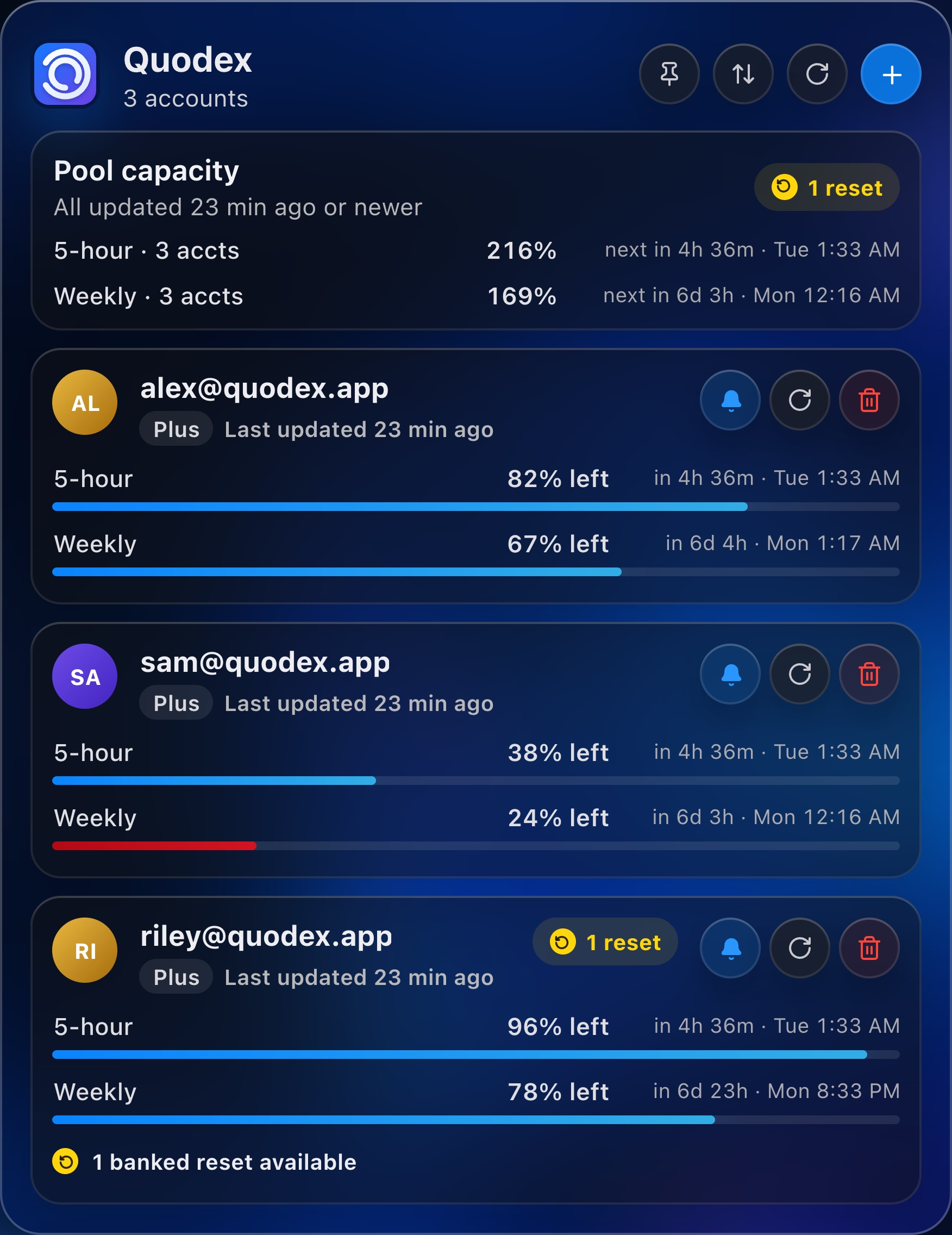
ALPlusLast updated 23 min ago
5-hour82% leftin 4h 36m · Tue 1:33 AM
Weekly67% leftin 6d 4h · Mon 1:17 AM
A lightweight menu bar app for every ChatGPT account — live usage, pooled capacity, countdowns, and banked resets.
 Quodex3 accounts
Quodex turns scattered usage windows and buried reset data into a centralized command center—right in your menu bar.
Short-window usage and exact countdowns
Weekly capacity across every account
Accounts supported with smooth scrolling
Background checks while Quodex runs
Every surface is designed to answer one question quickly: what can I use, and when does it come back?
Combine remaining capacity across connected accounts into one instantly readable signal.
Get optional local alerts for scheduled and early usage resets—plus automatic detection of newly banked resets.
Usage reset detected5-hour is available again for alex@quodex.app.
New banked reset1 new banked reset detected for sam@quodex.app (3 available).
See 5 hour, weekly, gpt-reserve, and every other lane the service actually reports.
Fresh data is labeled live for only a short window. Older snapshots show their exact age instead of pretending to be current.
Drag accounts into a custom order. Paid accounts stay prominent while new free accounts settle neatly at the bottom.
Refresh all accounts, update one account independently, or let Quodex check every account every 30 minutes while it runs.
Quodex3 accountsNo browser extension. No helper process. No Electron runtime. Just a tiny native app that lives where it belongs.
Install with Homebrew, or open the DMG and drag Quodex into Applications.
Use OpenAI's device-code sign-in. Add one—or add a hundred.
Your limits, resets, freshness, and capacity are ready at a glance.
Quodex is intentionally boring about your data: credentials live in your macOS Keychain, metadata stays on your Mac, and nothing is routed through a Quodex server.
QuodexNative menu-bar appNo third-party Swift packages. No helper. No local server. No extension. A focused, dependency-light app built to launch fast and stay out of your way.
Install with Homebrew, download the official release, or build the entire app yourself from public source.
Install Quodex from its maintained Homebrew tap with one command.
$ brew install --cask hxbib/tap/quodexFor Macs running macOS 14 or later.
Get the latest DMG$ git clone https://github.com/hxbib/Quodex.git
$ cd Quodex
$ ./Scripts/install-app.shThis release is not notarized. If macOS blocks the first launch, open System Settings → Privacy & Security → Open Anyway.
Quodex is intentionally small, transparent, and specific about what it does.
No. Quodex does not submit chats, route traffic, redeem banked resets, or read conversation content. It only reads usage and reset information through OpenAI services.
Access and ID tokens are saved as per-account generic-password items in the macOS Keychain. Refresh tokens returned during device login are discarded.
Quodex does not retry or refresh an expired or rejected access token. The account is marked “Login required,” and you can begin a fresh device-code flow for that account.
Quodex is distributed independently. macOS may ask you to confirm the first launch in System Settings → Privacy & Security → Open Anyway. Local source builds are ad-hoc signed for personal development.
No. Quodex is an independent open-source project and is not affiliated with or endorsed by OpenAI.
Every account, limit, reset, and countdown—beautifully clear.